Compare
Kajo vs OpenWhispr
OpenWhispr is a solid MIT-licensed dictation and meeting-notes app for macOS, Windows, and Linux: local dictation is unlimited and free, it imports audio and video files and labels speakers on-device, its AI chat runs on local models and can be scoped to a folder, and its paid plans add cloud models and sync. Kajo is built as the archive from the start: import any recording, transcribe on your machine, file it into folders, and ask a folder — or, with a confirm, the whole library — with answers cited to the recording and the moment. Free covers 5 files or 150 minutes of audio — total, for life; one $49 purchase unlocks unlimited imports and Lifetime convenience (watch folders, batch export) — one payment, no subscription.
OpenWhispr is built around dictation and meeting notes. Kajo is built around the recordings you keep — one private library on your machine, with answers cited to the moment and REFI-QDA export.
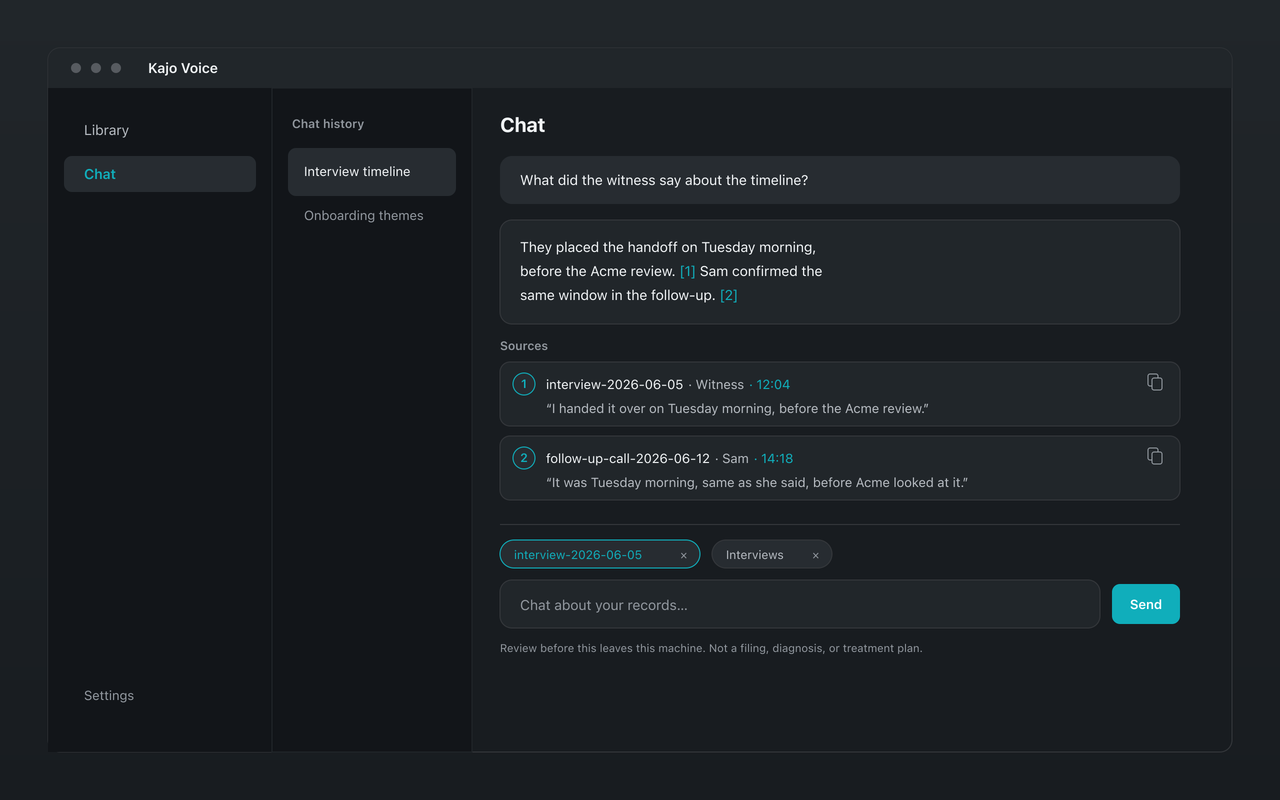
Why choose Kajo over OpenWhispr
-
Built around the recordings you keep
OpenWhispr started as dictation and has grown meeting notes and file import. Kajo is built around the recordings you keep: transcribed with speakers, translated on-device, and filed into one private library you can ask with citations.
-
Answers cited to the moment
OpenWhispr's chat answers from your meeting notes and transcripts, and its docs describe no citations. Kajo's answers cite the recording and the timestamp, and each citation's quote is matched against the transcript.
-
Translation on your machine
Translate a transcript into 59 languages with the same local model that answers your questions — no translation service in the loop.
-
REFI-QDA export built in
Export QDPX with each speaker as a code and exact timestamps, for NVivo, ATLAS.ti, or MAXQDA.
-
Nothing syncs off your machine
OpenWhispr's paid plans add cross-device sync. Kajo has no sync and no account — the library stays on the computer it was built on.
Kajo vs OpenWhispr: side by side
| Feature | Kajo | OpenWhispr |
|---|---|---|
| Primary job | A searchable archive of recordings | Dictation and meeting notes |
| Free tier | 5 files or 150 minutes of audio — total, for life; core loop included | Unlimited local dictation, 5 hours of meeting recording a month, speaker labels, and AI chat with local models; OpenWhispr Cloud transcription capped at 2,000 words a week |
| Paid plans | $49 launch / $99 standard — unlimited imports + Lifetime convenience (watch folders, batch export) | Pro $8/month or $80/year (cloud models, sync); Business $16/user/month or $160/user/year (adds “Chat over your data”) |
| Chat over your recordings | Yes — on your machine, cited to the moment | Yes — AI Chat with local models, which can be scoped to a folder (per its AI Chat page); its pricing lists “Chat over your data” on Business; citations not documented |
| Platforms | macOS (Apple Silicon), Windows (Microsoft Store), Linux | MIT; desktop installers for macOS, Windows, and Linux, and an iOS app that is free to download |
| REFI-QDA / QDPX export | Yes | No |
Which one fits you?
Choose OpenWhispr if…
- You want open-source (MIT) dictation and meeting notes in one app.
- You want your dictation synced across devices, including iOS.
Choose Kajo if…
- You want the recordings you keep in one library, with answers that cite the recording and the moment.
- You want no cloud option at all, on any plan.
- You code interviews in NVivo, ATLAS.ti, or MAXQDA and need QDPX export.
Frequently asked questions
OpenWhispr already has chat over your notes — why switch?
Its chat answers from your meeting notes and transcripts, on local models or, on Pro, cloud ones; its pricing page lists chat across all your data on Business and up. Kajo's answers cite the recording and the moment, quotes are checked against the transcript, and there is no cloud model to switch on. Kajo also imports any recording and exports QDPX for CAQDAS tools; one Lifetime purchase unlocks unlimited imports and Lifetime convenience (watch folders, batch export).
Does Kajo keep my data on-device?
Yes. There is no sync and no cloud-processing path; the library is a local database on your machine, and you can export any transcript or answer yourself.