Compare
Kajo vs Otter.ai
Otter is a cloud meeting notebook: its agent joins Zoom, Teams, and Meet on every plan, transcripts live in Otter's cloud, AI Chat is metered per plan, and outside Enterprise workspaces Otter trains its own models on de-identified recordings and transcripts. Kajo is for the recordings you already have — interviews, depositions, client calls, field tapes — transcribed on your machine, filed into a private library, and answered with citations over a folder or, with a confirm, the whole library. One $49 purchase unlocks unlimited imports and Lifetime convenience (watch folders, batch export) — one payment, no subscription.
Otter lives in your meetings and its cloud. Kajo lives on your machine: the recordings you already have, searchable and answerable with citations.
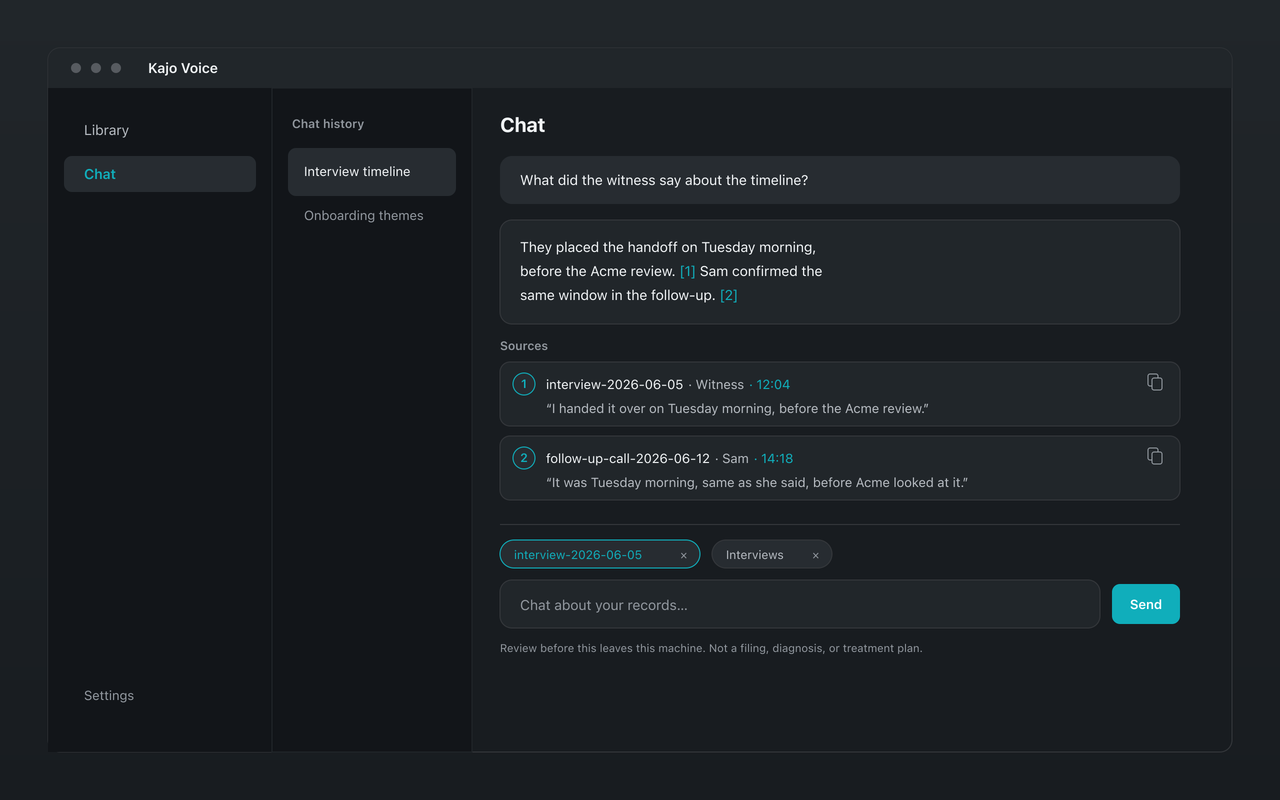
Why choose Kajo over Otter.ai
-
No bot in your calls
Otter's agent joins Zoom, Teams, and Meet on every plan, the free one included. Kajo never joins a call — it works on recordings you already have.
-
Audio never uploads
Otter keeps recordings and transcripts in its cloud. Kajo transcribes, indexes, and answers on your own machine.
-
No training on your recordings
Otter's privacy policy says it trains its own AI on de-identified audio recordings and on transcripts, and its help center says only Enterprise workspaces are opted out by default. Kajo never receives yours, so it cannot train on them.
-
Cited answers, no question meter
Otter's AI Chat is metered per plan, in its cloud. Kajo's chat runs locally, with no meter, and cites the moment each answer came from.
-
99 languages, any recording
Otter transcribes six languages. Kajo transcribes 99, from any audio or video file — interviews, depositions, field tapes, voice memos.
-
One purchase per person
Otter bills per user, per month. Kajo is one payment per person, and your installed version keeps working forever.
Kajo vs Otter.ai: side by side
| Feature | Kajo | Otter.ai |
|---|---|---|
| Where recordings live | On your machine | Otter's cloud |
| Capture | Import recordings you already have | Meeting agent joins Zoom, Teams, and Meet — one meeting at a time on the free plan |
| Free tier | 5 files or 150 minutes of audio — total, for life | 300 minutes/month, 30 minutes per conversation, 3 lifetime audio/video file imports, AI Chat 20 queries/month (3 per conversation); the meeting agent joins one meeting at a time |
| Paid | $49 launch / $99 standard | Pro $16.99/user/month billed monthly ($8.33/user/month billed annually) |
| Cited chat | Yes — on your machine | Yes (cloud) — AI Chat, metered per plan |
| Model training on your data | None — your recordings never leave your machine | Otter trains its own AI on de-identified audio recordings and on transcripts, which its policy says may contain personal information; the policy lists no opt-out, and Otter’s help center says Enterprise workspaces are opted out by default |
| Platforms | macOS (Apple Silicon), Windows (Microsoft Store), Linux | macOS and Windows desktop apps, web, iOS, Android, and a Chrome extension — no Linux app |
Which one fits you?
Choose Otter.ai if…
- You want live notes of meetings as they happen, shared with a team in the browser.
- Your team collaborates on meeting transcripts in the cloud, and uploading is fine.
Choose Kajo if…
- Your recordings are confidential, or are not meetings at all — interviews, depositions, sessions.
- You work in more than Otter's six languages.
- You would rather pay once than per user, per month.
Frequently asked questions
Does Kajo send a bot into meetings like Otter?
No. Kajo has no live capture and no meeting agent — it works on recordings and files you import. Nothing joins your calls.
Can I move my Otter recordings into Kajo?
Bring the audio. Otter's export rules: Basic exports plain text only, per Otter's help center (its pricing page also lists MP3); Pro and above add DOCX, PDF, SRT, and MP3 audio; bulk export needs Business. Import the MP3s and Kajo transcribes them on your machine; it does not import Otter's text transcripts.
Can my team share a Kajo workspace like Otter?
No — that is the deliberate wedge. Kajo is for individuals and small practices who want their audio to stay on their own machines, not a shared cloud notebook.
Does Kajo work offline?
Yes. After the one-time model download, transcription, translation, summaries, and cited chat all run with the network off. Otter can record offline and upload later, but it transcribes and answers only in its cloud.