For researchers and analysts

Every interview private,
every study answerable.

Transcribe consented interviews on your own computer, file them by study, and ask the study folder what participants said — with quotes you can play back. No participant's voice goes to a vendor your ethics board would have to vet.

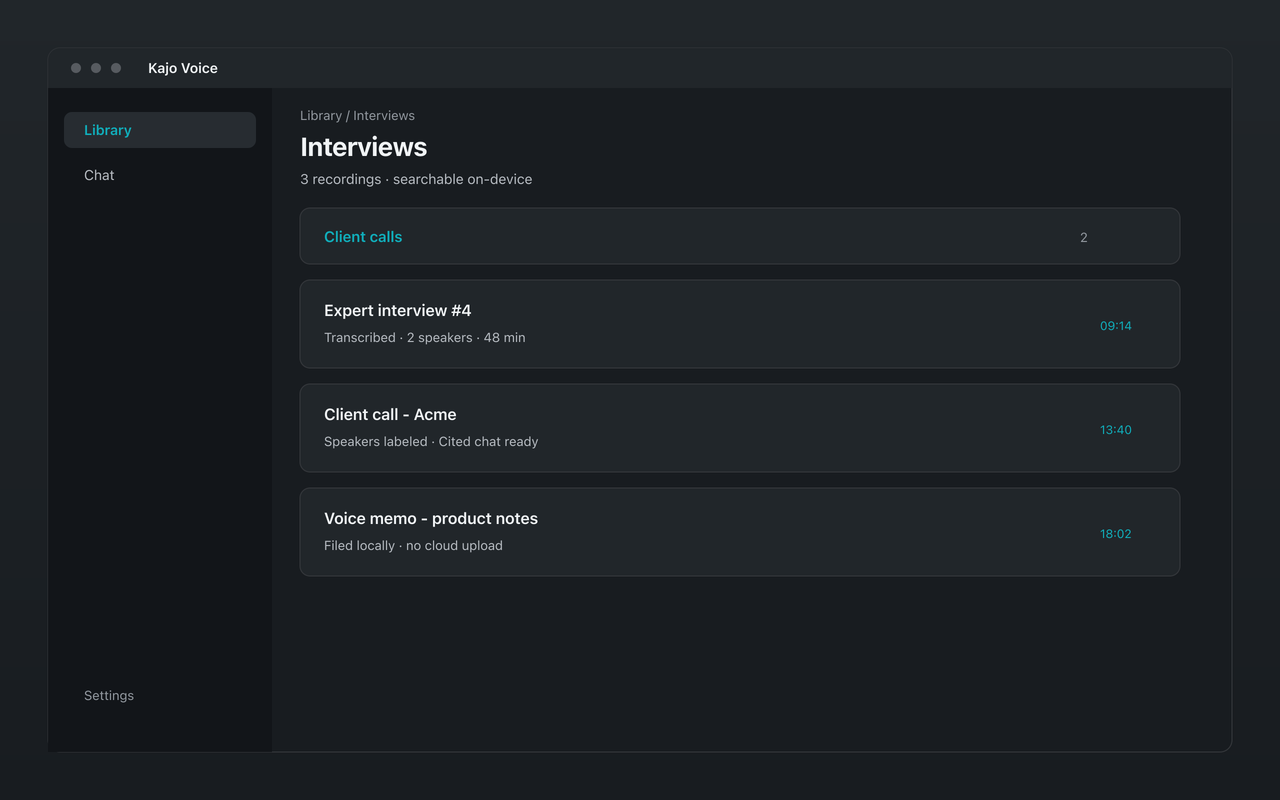
Kajo Voice research library with folders of transcribed interviews
One folder per study, one recording per participant — and the folder is what chat answers from.

Oral historians, ethnographers, and field linguists run the same loop: larger archives, more languages, and deed-of-gift consent that bars cloud tools. UX and market researchers use it for think-aloud sessions and customer interviews.

The jobs

File the study, then ask for the receipt

Import consented interviews into a study folder, one recording per participant ID, and let them transcribe on-device. Pin the folder and ask for the exact words on a topic you cannot find with a keyword: you get verified quotes with the speaker and timestamp, each one a click from the moment on the tape — or a plain “no supporting evidence” when the study never covered it.

Synthesize the corpus

The Themes starter answers what this set of participants said, where they agree, and where they disagree, with a quote for every claim. For a number, ask “how many recordings mention X?” — Kajo counts the transcripts that contain it. Starters wait until the library is fully indexed, so a count is never taken from half a study.

Brief yourself before the next interview

Before a follow-up session, ask for a brief on that participant's folder: what they have already said, open threads, and the questions the tape still does not answer — every point cited, so you can check it on the way in.

Attribute speakers, then code from evidence

Rename the automatic labels to participant and interviewer, then ask questions about one speaker's turns. When the study needs a CAQDAS, export QDPX: each speaker arrives as a code, with exact timestamps, in NVivo, ATLAS.ti, or MAXQDA. Chat complements your codebook; it does not replace it.

Draft a findings paragraph from citations

The Draft from citations starter writes a first-draft paragraph that stays tied to the tape, with inline citations. Export the answer and its quote list to Markdown or DOCX — with the reminder to review it before it leaves your machine.

Erase a participant

Withdrawn consent or an expired retention period: deleting the recording removes the app's audio copy, the transcript, the search index, and every chat pinned only to that recording, and strips its citations from other chats, whose answer text stays — delete those too if they quote the participant. The original file on your disk is yours to remove on your protocol's schedule.

Why the audio has to stay on your hardware

Qualitative research runs on consent, and consent comes with conditions: where recordings are stored, who can process them, and how quickly they are destroyed when a participant withdraws. Every cloud transcription or analysis service adds a processor to that chain — someone your ethics board has to vet, whose retention policy you inherit, and whose breach becomes your incident.

Kajo removes that step instead of documenting it. Transcription, speaker labelling, translation, search, and chat all run on the computer the recording is already on. Your protocol’s retention rules are enforced by you, on your disk, not by a vendor’s deletion queue.

Sample protocol language

Adapt this to your study; your ethics board or IRB decides what it needs.

Audio recordings of interviews will be transcribed and analysed using Kajo Voice, a desktop application that runs entirely on the researcher’s [institution-managed, encrypted] computer. Transcription, speaker identification, translation, and analysis are performed on that computer; no audio, transcript, or derived text is transmitted to the software vendor or to any other third party. Transcripts and analyses are stored in the application’s local database on that computer, protected by the institution’s device access controls and full-disk encryption; the application also keeps a compressed copy of each recording in its data folder on the same computer. The application makes network requests only to download its models (from the vendor’s server, or from Hugging Face when that server is unavailable), for software licensing and update checks, and to send feedback when the user chooses to. Its optional crash reports (sent to the vendor’s crash-reporting service, Sentry) and usage analytics are off unless the user agrees to them, and they remain switched off for this study. None of these requests carries audio, transcripts, or other research data. When a participant withdraws, their recording is deleted from the application, which removes that copy, its transcript, search index, and associated analyses; the original audio file is deleted separately in line with the study’s retention schedule.

Where Kajo fits in a research stack

Stage Tool What happens there
Record Your recorder or video-call tool Kajo does not record. Capture with the tool your protocol approves, with consent.
Transcribe Kajo On-device transcription in 99 languages, speaker labels, and translation if the interview needs it.
Explore Kajo Search every transcript; ask the study folder for themes, quotes, and contradictions, with citations.
Code NVivo, ATLAS.ti, or MAXQDA Import the QDPX export: speakers arrive as codes, with exact timestamps.
Close the study Kajo Batch-export what you archive (Lifetime), then delete what your protocol says must go.

Free

5 files or 150 minutes of audio — total, for life. Core loop (transcribe, translate, summarize, chat), no card, no upload.

  • Transcribes 99 languages on your laptop — all on-device.
  • Automatic speaker labels — rename, reassign, restore
  • On-device translation into 59 languages
  • A private library with folders and full-text search
  • Cited chat over the folders and recordings you pin
  • Export any single file — DOCX, PDF, SRT, QDPX, and more
  • Mac, Windows, and Linux

Lifetime

$49 Standard price $99 one-time

Launch price — $99 from December 10, 2026.

  • Unlimited files and minutes
  • Watch folders — new recordings import themselves
  • Batch export — a whole study or matter at once
  • One licence covers up to two computers at a time

Your installed version keeps working forever.

Frequently asked questions

Will my ethics board or IRB accept it?

That is their decision, but Kajo makes the data-flow section short: participant audio is processed on your computer and never sent to Kajo or any other vendor, transcripts are stored in a database on that computer, and withdrawal is a delete in the app. The sample protocol language on this page describes exactly that — adapt it to your study and your institution's device rules.

Can I export transcripts for coding in NVivo, ATLAS.ti, or MAXQDA?

Yes. Single-file export on Free includes QDPX (REFI-QDA) as well as DOCX, TXT, Markdown, PDF, CSV, JSON, and subtitle formats. QDPX brings each speaker in as a code with exact timestamps. Lifetime adds batch export for a whole study at once.

How is this different from Otter or Trint for academic research?

Both are cloud services: your participants' audio is uploaded to the vendor and processed on their servers, which is exactly what many ethics protocols and university data policies restrict. Kajo transcribes, labels speakers, and answers questions on your own machine, so there is no third-party processor to approve for the audio.

Can I organize interviews and observations together?

Yes. Nest folders — a study folder with interview and observation subfolders, say — then pin the study folder in Chat to ask across all of it, or a subfolder to ask one strand.

How many interviews can it handle?

As many as your disk holds; Lifetime removes the free allowance's 5-file / 150-minute cap. Transcription and indexing run on your machine, so a large study takes a while the first time — the chat starters appear once the library is fully indexed.

Your fieldwork. Your laptop. Your data.

Download Kajo, run a pilot interview, and read the transcript before any participant data exists anywhere else.