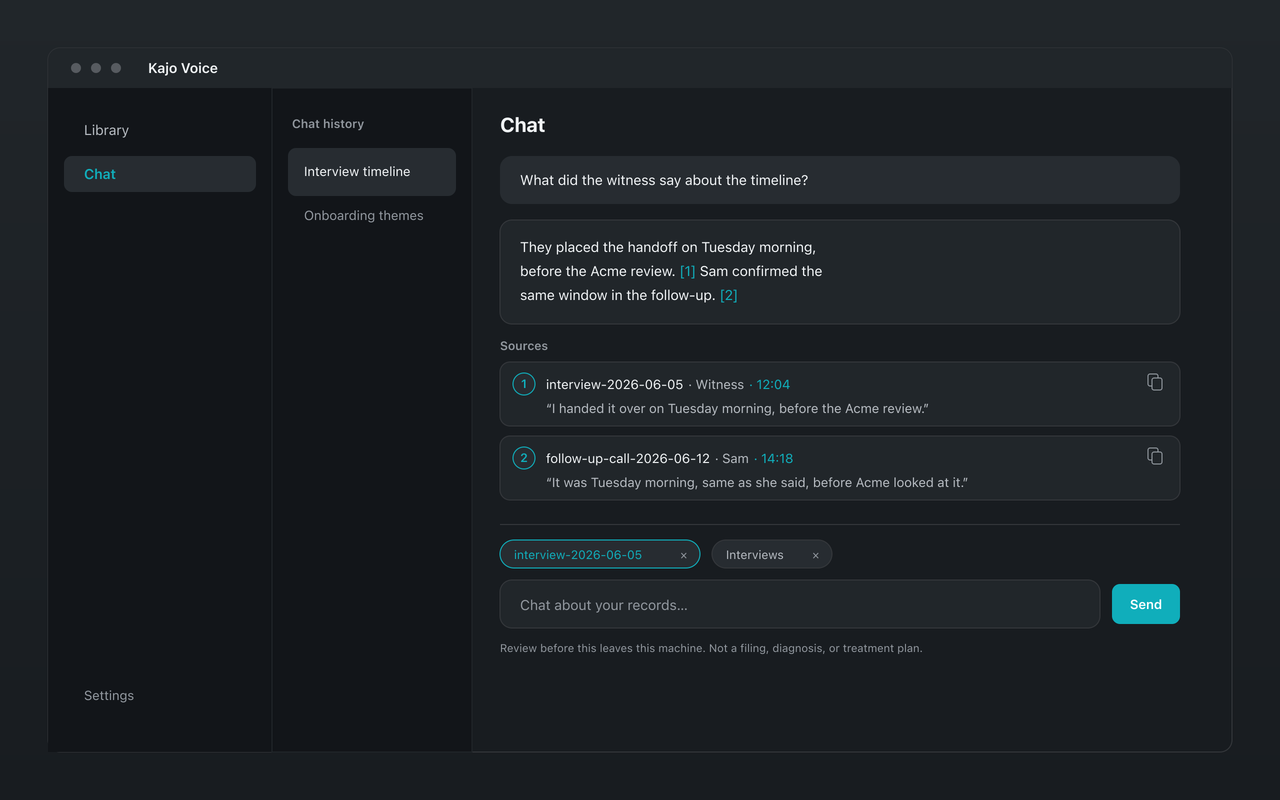
Every client call, filed by engagement. Cited. Local. Never mixed.
Import the week's calls, file them in that client's folder, and ask the folder what the experts actually said — with a quote, a speaker, and a timestamp for every claim. Nothing uploads, and one client's calls never answer another client's question.
Ask this folder — answers cite the call, never another client's recordings.
Expert-network heavy users, small-shop PE, credit, and hedge-fund associates running their own calls, and due-diligence independents run the same workstream loop — on the calls they are permitted to record.
The jobs
Empty the week's calls into a workstream
Import the call recordings — or, on Lifetime, let a watch folder pick up your recorder's exports. Rename experts to the role that belongs on the slide, “Expert 2 — former payer VP”, because that label becomes the attribution on every quote. File by client, workstream, or competitor.
Synthesize for Monday's deck
Ask what eight experts said about the reimbursement change and where they disagreed on unit cost. The answer comes back as themes with a quote for each claim — and says so when the calls cannot support the slide.
Pull quotes — and the quote sheet
Copy any cited quote with its speaker, timestamp, and source in one click. Then run the Quote sheet starter: the strongest quotes on a topic across the whole engagement, ready to drop into a deck.
Brief yourself before the next expert call
Before the second call on the same topic or with the same person, ask for a brief: what is already on tape, where the experts contradicted each other, and what you still do not have — from that folder only.
Draft slide-ready bullets from evidence
The Draft from citations starter writes bullets that stay tied to the calls, with inline citations. Export them to Markdown or DOCX, or paste them into the deck and keep the citations for the partner review.
Why client audio has to stay put
Client work runs on confidentiality clauses: NDAs, engagement letters, and — for expert calls — network terms that often limit what can be recorded at all. A cloud notetaker adds a company to every one of those conversations, with its own storage, its own retention policy, and in some cases its own model training.
Kajo keeps the whole loop on your machine. Record only what you are permitted to record, with consent. From there, transcription, speaker labels, and cited answers never leave the computer you already secure.
Kajo vs cloud meeting notebooks
Feature
Kajo
Otter.ai
Fireflies.ai
Where recordings are processed
On your machine
Otter’s cloud
Fireflies’ cloud
Joins your calls as a bot
Never — import recordings you already have
On every plan, the free one included
By default
Chat over your recordings
Yes, on your machine, with citations, scoped to the folders you pin
No. Transcription, speaker labels, translation, and cited chat all run on your machine. There is no cloud-processing path, so client audio never leaves the computer.
How do I keep Client A out of Client B's answers?+
File each engagement in its own folder and use Ask this folder. Chat answers only from the folders or recordings you pin, and searching the whole library takes an explicit confirm, because that is exactly where two clients could meet.
Is this a meeting-notes or CRM tool?+
No. Kajo never joins a call, writes your follow-ups, or syncs a CRM. It turns recordings you already have into a private library that answers with citations you can paste into the work.
What is deleted when I close an engagement?+
Deleting a recording removes Kajo's audio copy, its transcript, its search index, and chats pinned only to that recording; other chats lose their citations to it but keep their answer text. The original file on your disk is not deleted.
Can I ask in English about a call in another language?+
Yes. Translate the transcript on-device, then choose Ask this recording in English. Quotes stay in the original language, with the original timestamps, so you can check the translation against the tape.